How to Turn a Selfie into a Professional AI Headshot
No studio, no photographer, no appointment: here's how to get a professional headshot from a selfie, and what to check before you use it on LinkedIn or your resume.
A professional headshot doesn't have to mean booking a photographer or a studio. Turning a selfie into a professional AI headshot with a tool like Maleki AI can get you a usable result in minutes — for LinkedIn, a resume, a company site or a freelance profile. This guide covers what actually makes a photo read as "professional", how to pick a good source selfie, and how to check the result before you put it anywhere public.
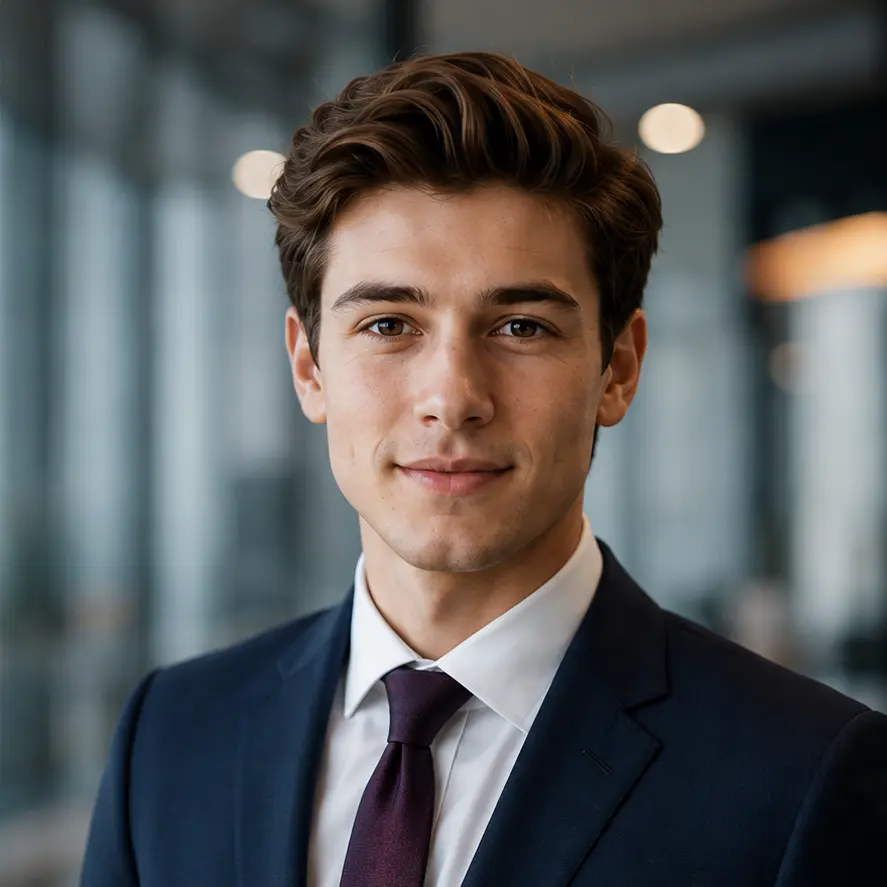
What makes a photo look credible as a professional headshot
Before generating anything, it helps to know what recruiters, clients or colleagues actually respond to in a professional photo:
- a clear, recognizable face — the person looking at your profile should recognize you if you met in person;
- even, flattering light, without harsh shadows across the face;
- a neutral or simple background that doesn't distract from the face;
- an outfit and expression that match the context (LinkedIn isn't a nightclub selfie, but it isn't a passport photo either);
- a result that still looks like a photo, not an obviously synthetic or over-smoothed image.
An AI headshot generator can help with most of this — but the selfie you start from still matters more than any setting.
Choosing the right selfie to start from
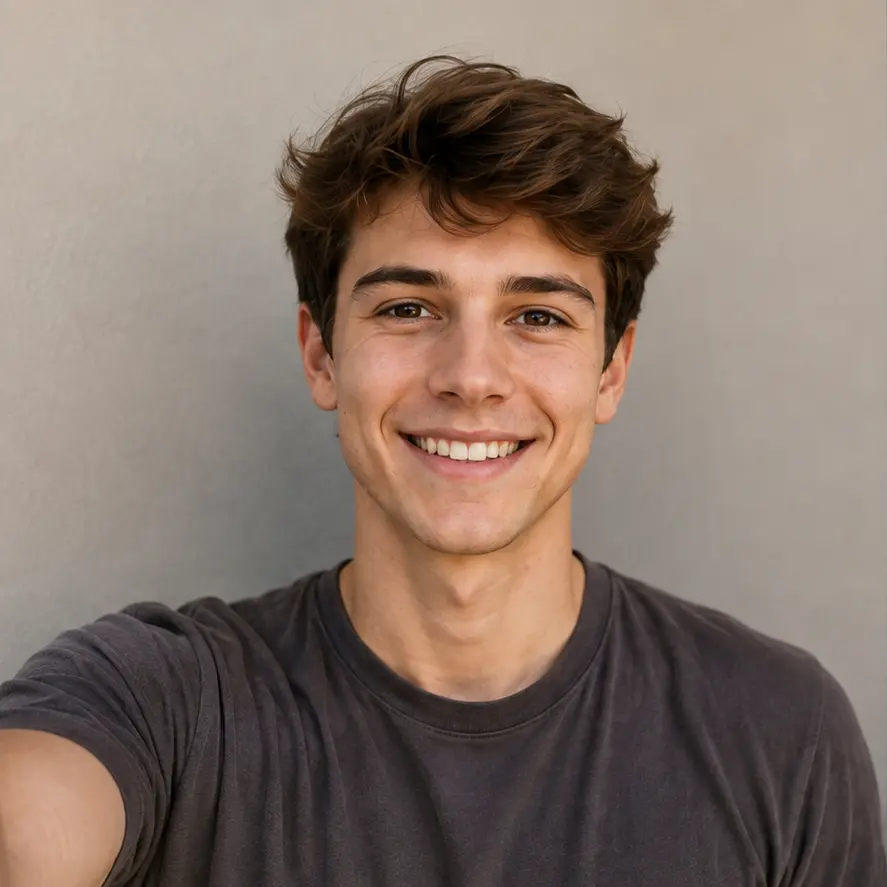
The AI works from what it's given. A good source selfie makes a real difference to the result:
- One person only, no one else partially in frame.
- Sharp, clearly recognizable face — avoid blurry or very low-resolution photos.
- Natural or even lighting: daylight near a window, or uniform indoor light. Avoid strong backlight or a light source only on one side of the face.
- Face fully visible, not partly covered by hair, a hand, a mask or a scarf.
- No heavy beauty filter on the source photo — it can distort proportions in ways the AI will carry into the result.
- No sunglasses and no hat: both hide details the AI needs to keep the result recognizable.
- Head-and-shoulders framing if possible, facing roughly toward the camera.
- A natural expression — you don't need to force a big smile, just avoid an exaggerated or mid-motion expression.
If the only photo you have of yourself is old, damaged or low quality, restoring it first can help. See our guide on restoring an old or damaged photo with AI, then come back here to turn the restored version into a professional headshot.
Choosing an expression, outfit and background for the occasion
Once you have a good selfie, think about where the photo will actually be used. On Maleki AI, once a first result is generated, you can also touch up just the background, the outfit or the expression without paying for a full new generation — so you don't need to get everything perfect on the first try.
- A calm, approachable expression generally works better than a wide smile for a corporate or executive context, and better than a stiff, neutral face for a creative or freelance profile.
- A simple, business-appropriate outfit reads as more professional than something casual, but this depends on your industry — a creative portfolio can afford more personality than a law firm's team page.
- A plain or softly blurred background keeps the attention on your face; a background that's too busy competes with it.
Which format for which use
The same photo won't necessarily work identically everywhere. A few practical guidelines:
| Use | What tends to work well |
|---|---|
| A close head-and-shoulders crop, direct eye contact with the camera, a simple background, and an expression that looks approachable rather than overly formal. | |
| Resume / CV | A more neutral, understated version — the photo should support your application, not draw attention away from your experience. |
| Company website | Consistency matters here: if colleagues' photos share a similar framing, tone or background, try to match that style. |
| Freelance profile | A bit more personality is usually fine — a warmer expression or a slightly less formal outfit can help you seem approachable to potential clients. |
Turning your selfie into a professional photo with Maleki AI, step by step
- Open the "Turn your selfie into an AI photo" section on the Maleki AI homepage.
- Upload your selfie (a face clearly visible, as described above).
- Choose the "Pro photo" style.
- Check the price shown before starting the generation.
- Start the generation.
- Once the result is shown, use the background, outfit or expression touch-up options if you want to adjust a specific detail, without paying for a full new generation.
- Compare the result with your original selfie before downloading it (see the checklist below).
- Download the result, and keep your original selfie as well.
How to check the result before you use it
Before putting a generated headshot on LinkedIn, your resume or a company page, take a moment to check it properly:
- Likeness: does it still look like you, to someone who knows your face?
- Eyes, teeth, hair and skin: look closely for anything that seems off or unnatural at normal viewing size.
- Clothing edges: check where the outfit meets the neck, shoulders and hands for any blending or distortion.
- Light consistency: the light on the face should look consistent with the rest of the photo, not mismatched.
- No visible artifacts: no strange textures, duplicated details or warped edges.
If something looks off, the background, outfit or expression touch-up options mentioned above are usually a faster fix than starting over from scratch.
The honest limits of an AI headshot
A few realistic expectations before you rely on an AI-generated headshot:
- The AI interprets details like hair, clothing texture or background rather than copying them exactly — small elements may not match reality precisely.
- The result should stay clearly recognizable as you; if a generated version looks meaningfully different from your face, don't use it as your primary professional photo.
- Avoid picking a result so retouched that it no longer looks like a real, current photo of you — a professional photo is meant to represent you accurately, not an idealized version.
- Keep your original selfie. It's useful if you want to try a different style or outfit later, and it remains your reference photo.
Cropping and choosing your final photo
- Generate more than one version if you're unsure, and compare them side by side rather than judging the first result in isolation.
- Check how the photo looks small (as a thumbnail-sized profile picture), not just at full size — that's how most people will actually see it.
- Make sure the crop keeps your full face and shoulders comfortably in frame, without cutting off the top of your head or feeling too tight.
- When in doubt between two similar results, the one where your expression looks most natural is usually the safer choice.
Want a photo with someone else instead of a solo headshot — a partner, a friend, even a pet? See our guide on creating an AI couple photo from two selfies.
Privacy: what happens to your selfie?
According to our privacy policy, the photo you upload is processed temporarily, solely to provide the requested service — it isn't kept by Maleki AI as a permanent gallery. A photo awaiting payment may be processed and held temporarily, for a few hours, as described in the policy. The generated result may then remain accessible for up to seven days, giving you time to download it. The providers needed to run the service are listed in the privacy policy. Your photos are not resold for commercial purposes.
For full details (exact retention periods, sub-processors, your rights), see our Privacy Policy.
FAQ — Professional AI Headshot
Which selfie should I choose as a starting point?
A sharp, well-lit selfie showing only your face and shoulders, without sunglasses, a hat, or a heavy beauty filter. See the selection checklist above for the full list.
Is one photo enough?
Yes, one clear selfie is enough to start. If you're unsure which one works best, you can generate a result and compare it with the original before deciding.
Will my face still be recognizable?
The AI aims to keep a recognizable result based on your selfie. Always check the generated photo against your own face before using it, and avoid a version that feels meaningfully different from how you actually look.
Can I use the result on LinkedIn or a resume?
Yes, that's a common use for this style. Just make sure the result still looks like a natural, current, and recognizable photo of you before publishing it.
Do I need to wear professional clothing in the source selfie?
No, your outfit in the source selfie doesn't need to be professional. The AI can help adapt the style, and you can also adjust the outfit afterward with the touch-up option if the result doesn't match what you had in mind.
Can I create the photo from my phone?
Yes. The tool works from any selfie you upload, whether it was taken on a phone or another camera, as long as your face is clear and well lit.
How do I avoid a result that looks artificial?
Start from a natural, unfiltered selfie, avoid over-retouched results, and check details like eyes, hair, skin and clothing edges closely before using the photo. If something looks off, try the touch-up options or generate another version.
Want a professional headshot from your own selfie?
Create your AI headshot on Maleki AI